Building a Production-Ready Integration: Auth, Rate Limits, and Retries
How to structure a robust integration with the Quantilence API — authentication and scopes, rate limit tiers, idempotency keys, and a retry strategy that handles errors correctly.
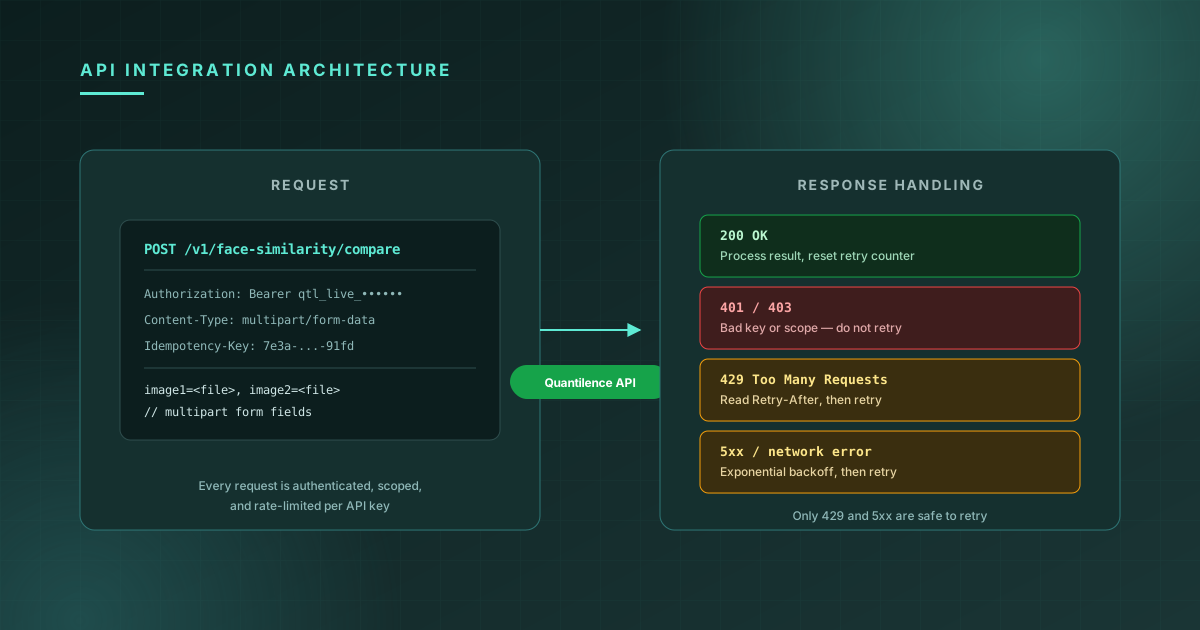
Getting a single API call working is a five-minute task: grab an API key, make a request, read the response. Getting that integration to behave correctly under real production conditions — when a key is misconfigured, when traffic spikes past your plan's rate limit, when a request times out mid-flight — is a different task entirely, and it's the one that determines whether an outage in your dependency becomes an outage in your product.
This post covers the architecture decisions that separate a prototype integration from a production one: how authentication and scopes work, how rate limits are structured across plans, when to use idempotency keys, and how to build a retry strategy that helps rather than makes things worse.
Authentication and scopes
Every request authenticates with a Bearer token in the Authorization header:
Authorization: Bearer qtl_live_3f9a1c2b8e4d7f6a0b1c2d3e4f5a6b7c
Two details about the key format matter for how you structure your integration:
live vs. test environments. Keys are prefixed qtl_live_ or qtl_test_. Test keys hit the same API surface but don't count against your production rate limits or billing — use them in CI, staging, and local development, and reserve live keys for production traffic. Storing both as separate environment variables (QUANTILENCE_API_KEY_LIVE, QUANTILENCE_API_KEY_TEST) and selecting based on NODE_ENV or a deploy-environment flag avoids the class of bug where a staging deploy accidentally consumes production quota.
Scopes. Each key is provisioned with scopes for specific APIs (face-similarity, face-liveness, ocr, document-ai, and so on). A request with a valid key but the wrong scope returns 403, not 401 — which matters for debugging, because it tells you the credential itself is fine but isn't authorized for this endpoint. If you're integrating multiple products, check which scopes your key has been issued before assuming a 403 is a bug in your request.
import { Quantilence } from "@quantilence/sdk";

const client = new Quantilence({
  apiKey: process.env.NODE_ENV === "production"
    ? process.env.QUANTILENCE_API_KEY_LIVE
    : process.env.QUANTILENCE_API_KEY_TEST,
});
Rate limits are layered, not flat
Rate limits aren't a single number — they're enforced at three levels simultaneously, and each plan tier sets all three:
| Plan | Requests/minute | Daily limit | Monthly limit | |---|---|---|---| | Starter | 20 | 300 | 2,000 | | Growth | 60 | 2,500 | 20,000 | | Pro | 150 | 10,000 | 75,000 | | Enterprise | Custom | Custom | Custom |
The per-minute limit (rpm) is what you'll hit during a traffic burst — a batch job that fires off 100 requests at once on the Starter plan will see 429s after the 20th, even if the daily and monthly totals have plenty of headroom. The daily and monthly limits are what you'll hit from sustained volume over time, and they reset on a fixed schedule rather than a rolling window.
This layering has a direct design implication: a retry-with-backoff strategy handles per-minute rate limiting well, but it can't fix a daily or monthly limit being exhausted. If your monthly quota is gone, every retry will also return 429 until the next billing cycle — at that point, the correct response is to surface the error and either queue the work for later or alert that a plan upgrade is needed, not to keep retrying.
Handling responses correctly
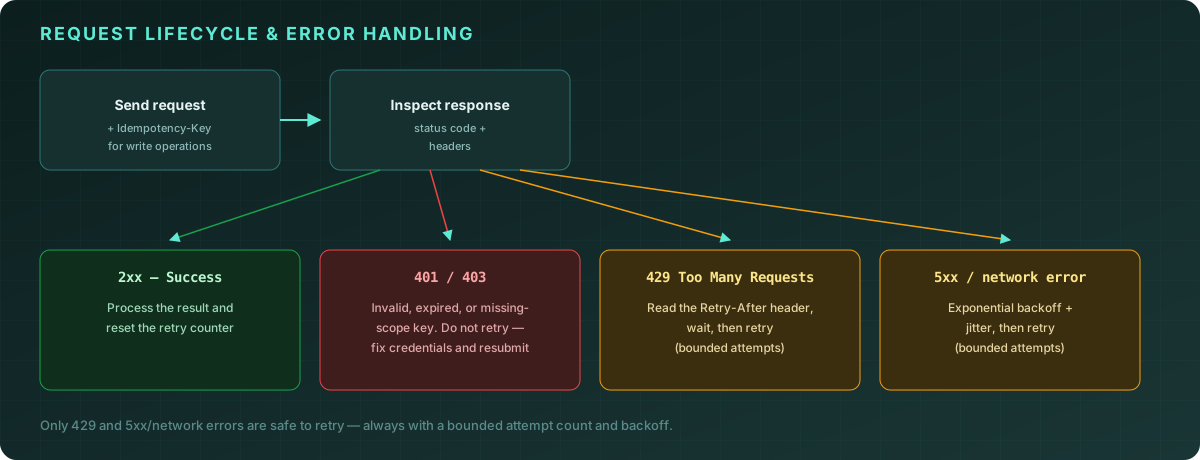
The shape of correct error handling depends entirely on the status code, and conflating categories is the most common source of integration bugs:
2xx — success. Process the result. If you're tracking a retry counter for this logical operation, reset it.
401 / 403 — don't retry. A 401 means the API key itself is invalid, expired, or revoked. A 403 means the key is valid but lacks the scope for this endpoint. Neither of these resolves itself by waiting and trying again — retrying just burns through your rate limit while returning the same error. These should fail fast and surface loudly (logs, alerts), because they typically indicate a configuration problem that needs a human to fix.
429 — retry, respecting Retry-After. Rate limit responses include a Retry-After header indicating how long to wait before the next attempt is likely to succeed. Use it — it's more accurate than a fixed backoff schedule, especially for per-minute limits where the window resets predictably.
5xx / network errors — retry with exponential backoff and jitter. Server errors and network failures (timeouts, connection resets) are often transient. Retrying immediately tends to hit the same transient condition again, and retrying many clients simultaneously without jitter creates synchronized retry storms that make a partial outage worse. Exponential backoff with jitter spreads retries out over time.
async function callWithRetry<T>(
  fn: () => Promise<T>,
  maxAttempts = 4
): Promise<T> {
  for (let attempt = 1; attempt <= maxAttempts; attempt++) {
    try {
      return await fn();
    } catch (err) {
      if (!(err instanceof QuantilenceApiError)) throw err;

      // Never retry auth/scope errors
      if (err.status === 401 || err.status === 403) throw err;

      const isLastAttempt = attempt === maxAttempts;
      const isRetryable = err.status === 429 || err.status >= 500;
      if (!isRetryable || isLastAttempt) throw err;

      const retryAfter = err.headers?.["retry-after"];
      const delayMs = retryAfter
        ? Number(retryAfter) * 1000
        : Math.min(1000 * 2 ** (attempt - 1), 8000) + Math.random() * 250;

      await new Promise((resolve) => setTimeout(resolve, delayMs));
    }
  }
  throw new Error("unreachable");
}
A bounded maxAttempts is not optional. An unbounded retry loop against a 429 that's actually a monthly-limit exhaustion will retry forever, and an unbounded retry loop against a persistent 5xx will pile up requests behind your application's own timeout, often making the user-facing failure slower and less clear than if it had failed immediately.
Idempotency for write and async operations
For operations that aren't pure reads — anything that creates a record, triggers a webhook, or has a side effect beyond returning a result — include an Idempotency-Key header:
const result = await client.someWriteOperation({
  data: payload,
  idempotencyKey: crypto.randomUUID(),
});
The reason this matters is specifically the retry logic above. Consider a request that succeeds on the server side, but the response is lost to a network error before your client receives it. Your retry logic, seeing a network error, correctly retries — but without an idempotency key, that retry creates a second record for what was logically one operation. With an idempotency key, the server recognizes the retried request as a duplicate of one it already processed and returns the original result instead of creating a second one.
Generate the idempotency key once per logical operation, before the first attempt — not per HTTP attempt. If you generate a new key on each retry, you've defeated the purpose: each retry looks like a new operation again.
// Correct: one key for the whole operation, reused across retries
const idempotencyKey = crypto.randomUUID();
await callWithRetry(() =>
  client.someWriteOperation({ data: payload, idempotencyKey })
);
Structuring the client wrapper
Putting this together, a thin wrapper around the SDK gives you one place to enforce these patterns rather than re-implementing them at every call site:
import { Quantilence, QuantilenceApiError } from "@quantilence/sdk";

class ApiClient {
  private client: Quantilence;

  constructor() {
    this.client = new Quantilence({
      apiKey: process.env.NODE_ENV === "production"
        ? process.env.QUANTILENCE_API_KEY_LIVE!
        : process.env.QUANTILENCE_API_KEY_TEST!,
    });
  }

  async faceSimilarity(image1: Buffer, image2: Buffer) {
    return callWithRetry(() =>
      this.client.faceSimilarity.compare({ image1, image2 })
    );
  }

  // ... one method per API your application uses, each wrapped in callWithRetry
}

export const api = new ApiClient();
Every call site in your application calls api.faceSimilarity(...) and gets the retry behavior, environment selection, and error categorization for free — and if the retry policy needs to change (a different backoff curve, an added metric on retry counts), it changes in one place.
Common pitfalls
Treating all 4xx errors as retryable. Only 429 is. A 400 (bad request — malformed input) or 404 will return the identical error on retry, because the request itself is the problem, not a transient condition.
Logging retries as if they were failures. A request that returns 429, waits, and succeeds on the second attempt is a successful request from the application's perspective — log it as a success with a retry count, not as an error. Alerting on every retry creates noise that obscures the signal of requests that exhaust all retries and genuinely fail.
Sharing one API key across environments. A single key used for local development, CI, staging, and production makes it impossible to tell which environment is consuming quota, and means a runaway local test script can exhaust production rate limits. Provision separate keys per environment — live keys for production, test keys for everything else.
Not handling the monthly-limit case distinctly. As covered above, a 429 from per-minute rate limiting and a 429 from monthly quota exhaustion look identical at the HTTP level but require different responses — one is "wait a few seconds," the other is "this won't resolve until next month, or until the plan is upgraded." If your retry logic treats both the same way, monthly exhaustion turns into a long sequence of failed retries instead of a clear, actionable error.
Frequently asked questions
How do I know which rate limit tier I'm on?
Your plan determines rpm, daily, and monthly limits — see the table above. The dashboard shows your current usage against these limits in real time.
Should I implement client-side rate limiting in addition to retries?
For predictable, high-volume workloads (batch jobs, scheduled syncs), yes — proactively pacing requests to stay under your rpm limit avoids generating 429s in the first place, which is more efficient than generating them and then backing off. For request-driven traffic (a user-initiated action), retry-with-backoff is usually sufficient since volume is naturally bounded by user activity.
What happens to in-flight requests if I rotate my API key?
Requests already in flight when a key is revoked will complete normally if they were authenticated before revocation; new requests using the revoked key will return 401 immediately. When rotating keys, provision the new key and deploy it before revoking the old one, rather than revoking first — this avoids a window where neither key is valid.
Is the idempotency key required for read-only operations like face similarity or OCR? No — idempotency keys matter for operations with side effects (creating records, triggering webhooks, anything that shouldn't happen twice). Pure read/compute operations like face similarity, face detection, or OCR extraction can be retried freely without an idempotency key, since retrying them produces the same result without any duplicated side effect.
Conclusion
A production-ready integration isn't defined by the happy path — it's defined by what happens when a request returns something other than 200. Authenticate with environment-appropriate keys, understand that rate limits are layered (per-minute, daily, monthly) and require different responses, retry only what's safe to retry with backoff and bounded attempts, and use idempotency keys for anything with a side effect. Get this layer right once, in one place, and every API call your application makes inherits it.