1:N Face Search at Scale: How Face Recognition Finds a Match in Millions
How 1:N face recognition pipelines turn a face into a searchable vector and rank candidate matches across millions of identities — architecture, code, and accuracy benchmarks.
A bank onboards a new customer and wants to know: has this person already opened an account under a different name? A casino's surveillance team flags a face at the door and wants to know: is this person on our self-exclusion list? A streaming platform suspects account sharing and wants to know: how many distinct faces have logged into this account this month?
None of these questions can be answered by comparing two specific images. They require searching one face against a gallery that might contain a few hundred entries — or several million. That's 1:N face recognition (also called face search or identification), and it's a fundamentally different engineering problem than the 1:1 face matching most people picture when they hear "face recognition."
1:1 verification vs. 1:N identification
These two modes get conflated constantly, but they answer different questions, have different performance characteristics, and require different infrastructure.
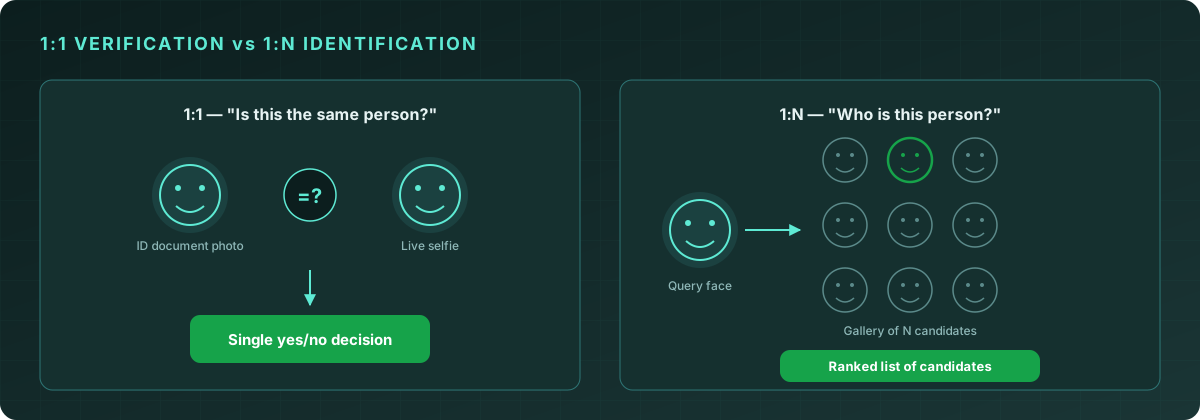
1:1 verification asks "is this the same person as that?" — a single comparison between two images, returning a similarity score. This is what powers selfie-to-ID-document checks during onboarding. The cost is constant regardless of how many users your system has, because you're only ever comparing two specific images at a time.
1:N identification asks "who is this person, if anyone, out of everyone we know about?" — one face compared against an entire gallery, returning a ranked list of the closest candidates. The cost scales with the size of the gallery (N), which is the entire engineering challenge: a naive implementation that's fast enough for a 500-person watchlist falls over completely at 5 million enrolled identities.
Quantilence's Face Recognition API is built for the second case — searching a face against a gallery and getting back ranked matches with confidence scores, fast enough to run in real time even as the gallery grows.
Inside a face recognition pipeline
Searching a face against a large gallery happens in four stages, and understanding each one explains both why the system is fast and where its accuracy comes from.
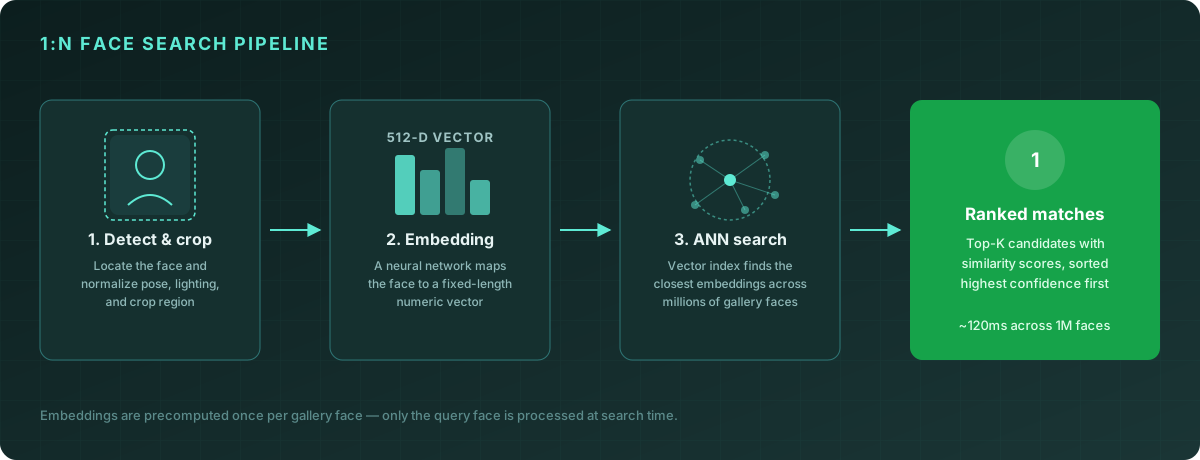
1. Detect and crop
Before anything can be compared, the system needs to find the face in the submitted image, correct for pose and lighting variation, and crop it to a normalized region. This is the same detection step used by Quantilence's Face Detection API — accurate cropping matters because everything downstream operates on this region.
2. Generate an embedding
A neural network maps the cropped face to a fixed-length numeric vector — typically 512 dimensions. This embedding is the core idea that makes face search tractable: instead of comparing raw pixels (slow, and brittle to lighting/pose changes), the model has learned to project faces into a space where two images of the same person land close together, and images of different people land far apart, regardless of lighting, angle, expression, or image quality.
Critically, this step happens once per gallery face, at enrollment time — not at search time. When you enroll a million identities, you compute a million embeddings up front and store them in an index. At search time, only the query face needs a fresh embedding.
3. Approximate nearest-neighbor (ANN) search
With the query embedding in hand, the system needs to find the closest vectors in the gallery index. For a small gallery, you could compute the distance to every single entry — but at a million-plus scale, that becomes the bottleneck. Production face search systems use approximate nearest-neighbor (ANN) indexes (structures like HNSW or IVF) that organize embeddings so that a search touches a small fraction of the index instead of all of it, trading a negligible amount of recall for orders-of-magnitude speedup.
This is the step that makes "search 1 million faces in ~120ms" possible. The query embedding generation (step 2) takes roughly the same time whether your gallery has 100 entries or 100 million — it's the index search that has to be engineered for scale.
4. Ranked matches
The search returns the top-K closest gallery entries, each with a similarity score. The response is ordered by confidence, so the most likely match is first — but it's still your application's job to decide what counts as a "match" versus "no match found," based on a threshold appropriate to your use case.
Calling the API
A search request takes an image and a top_k parameter controlling how many candidates to return:
const result = await client.faceRecognition.search({
  image: queryImageBuffer,
  top_k: 5,
});

console.log(result);
// {
//   success: true,
//   matches: [
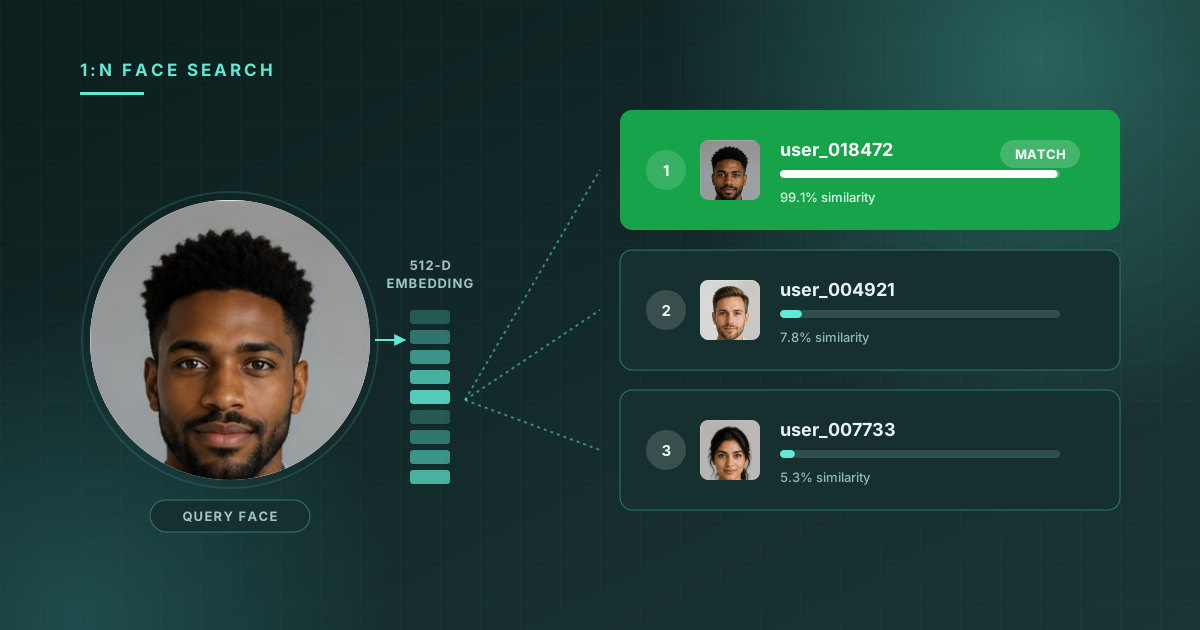
//     { name: "user_018472", score: 99.1 },
//     { name: "user_004921", score: 7.8 },
//     { name: "user_007733", score: 5.3 }
//   ],
//   face_count: 1,
//   threshold: 0.7,
//   processing_time_ms: 118
// }
The score field is a 0–100 similarity percentage. In the example above, the top result at 99.1% is almost certainly the same person — the next candidates at 7.8% and 5.3% are nowhere close, which is the typical shape of a confident match: one result far ahead of the rest, rather than several clustered scores.
const threshold = result.threshold * 100;
const topMatch = result.matches[0];

if (topMatch && topMatch.score >= threshold) {
  console.log(`Identified as ${topMatch.name} (${topMatch.score.toFixed(1)}%)`);
} else {
  console.log("No confident match found in gallery");
}
Choosing top_k and a similarity threshold
Two parameters shape how a face search behaves in production, and they're independent of each other:
| Parameter | What it controls | Typical value |
|---|---|---|
| top_k | How many ranked candidates to return | 1 for automated decisions, 5–10 for human review queues |
| threshold | The similarity score above which a result counts as a "match" | 0.7 (70%) default; raise for high-stakes decisions |
A low top_k with a high threshold is appropriate for automated identification — for example, "log this user in as the matched identity, or reject if no match clears 90%." A higher top_k with a lower threshold suits investigative workflows — for example, presenting a fraud analyst with the 10 closest candidates and letting a human make the final call, since a borderline 60% match might still be useful context even if it shouldn't trigger an automatic decision.
Don't set the threshold to 100% expecting only exact duplicates — even two photos of the same person taken seconds apart rarely score a perfect 100, due to natural variation in compression, lighting, and the embedding model's own precision.
Common 1:N use cases
Duplicate account / identity dedup. During KYC onboarding, search each new selfie against your existing enrolled-user gallery before creating an account. A high-confidence match against an existing user means someone is attempting to open a second account — intentionally (fraud, ban evasion) or accidentally (forgot they already had one).
Watchlist and sanctions screening. Maintain a gallery of faces associated with known fraud rings, self-exclusion lists, or sanctioned individuals, and search incoming users against it. Unlike dedup, a match here should route to manual review rather than an automatic block, since false positives carry real consequences for legitimate users.
Access control. Search a face captured at a door, gate, or checkpoint against an enrolled gallery of authorized individuals — the inverse of a badge or PIN, with the gallery acting as the "allow list."
Cross-session identity linking. In flows where a user might interact with your system multiple times without a persistent login (kiosks, repeated support escalations), 1:N search can link sessions to a returning identity without requiring the user to remember credentials.
In every case, the gallery is something you build and control by enrolling faces explicitly — Quantilence does not ship or maintain any pre-built gallery of identities.
Implementation best practices
Enroll embeddings, not raw images, where possible. If your architecture allows it, store the embedding vector for each gallery entry rather than re-computing it from a stored image on every search. This keeps your gallery index lean and avoids re-running face detection on enrollment images repeatedly.
Re-enroll when image quality improves. If a user later provides a clearer photo (e.g., a better-lit selfie during a subsequent verification), re-running enrollment with the higher-quality image improves future match accuracy for that identity.
Treat top_k > 1 results as context, not just noise. Even when your top match clears the threshold, the gap between the first and second result is itself informative — a 99% top match with an 85% second-place result is less conclusive than a 99% top match with a 10% second-place result, even though both technically "pass."
Log scores, not just pass/fail. Storing the full ranked match list (or at least the top-3 scores) for audit purposes lets your fraud or compliance team review borderline decisions later without needing to re-run the search.
Combine with liveness detection for identity claims. If a 1:N search result will be used to make a decision about a live person (e.g., "let this person into the building"), pair it with liveness detection on the query image — otherwise a printed photo of an enrolled face could pass the search.
Frequently asked questions
How is 1:N search different from the face matching used in ID verification? ID verification is typically 1:1 — comparing a selfie to a single ID document photo. 1:N search compares one face against an entire gallery and returns ranked candidates. Quantilence's Face Similarity API handles the 1:1 case; Face Recognition handles 1:N.
Does gallery size affect query latency? With an ANN-indexed gallery, query latency grows much slower than gallery size — Quantilence targets ~120ms for searches across galleries in the millions. The dominant per-query cost is generating the embedding for the query image, which is constant regardless of gallery size.
What if no match is found?
The API still returns the top-K closest candidates by score — it's your application's responsibility to compare the top score against your threshold and treat anything below it as "no match." A response with matches populated does not by itself mean a match was found.
Can the same face appear multiple times in a gallery under different names? Yes, and this is itself a useful signal — if a 1:N search against your own gallery returns two different enrolled identities both scoring above your match threshold for the same incoming face, that's a strong indicator of a duplicate or fraudulent enrollment worth investigating.
Conclusion
1:N face search turns identity verification from "does this match that one specific record?" into "does this match anything we know about?" — a question that's essential for fraud prevention, deduplication, and access control, but only practical at scale with the right architecture: embeddings computed once at enrollment, an ANN-indexed gallery, and a search step engineered to stay fast as N grows into the millions.
The Quantilence Face Recognition API is available with 500 free requests per month. Try a search against the demo gallery →